
A voyage management system may already sit at the center of your commercial operation.
It tracks the voyage, vessel schedule, charter-party terms, freight, bunker exposure, and financial result. Your ERP may also handle the ledger, vendor bills, customer invoices, and company reporting.
Yet the work surrounding each port call may still happen somewhere else.
Local agents coordinate pilots, tugs, launches, husbandry services, approvals, documents, PDAs, and FDAs through email, spreadsheets, and separate vendor records. Commercial teams can see the voyage. Finance can see the posted transaction. Neither record always shows the full history behind the port call.
That is usually when the question comes up: Do we need dedicated port call software when we already have a voyage management system or maritime ERP?
The answer depends on how much of the local workflow your current systems actually cover.
This guide explains what voyage management system vs port call software is, where port call system each fit, where their responsibilities overlap, and where an uncovered handoff can lead to missed charges, slower FDA approval, and weak cost visibility.
What Is a Voyage Management System?
A voyage management system, commonly called a VMS, helps a shipping company plan, manage, and review the commercial performance of a voyage.
The system usually begins supporting the voyage before the vessel sails. Commercial and operations teams can use it to estimate revenue, expected costs, bunker consumption, duration, and likely profit.
Once the voyage is active, the same system may track vessel schedules, cargo commitments, freight, charter-party obligations, bunker activity, and operational changes. After completion, it can help the company review the voyage result and compare actual performance with the original estimate.
The exact capabilities depend on the VMS. Common functions include:
- Voyage estimation
- Vessel scheduling
- Fixture and charter-party records
- Cargo and freight tracking
- Bunker planning
- Laytime calculations
- Demurrage management
- Voyage accounting
- Voyage P&L
- Claims and performance reporting
This gives owners, charterers, operators, and vessel managers a commercial view of the voyage. They can see where the vessel is expected to go, what it is carrying, what the voyage may cost, and how the final result compares with the plan.
Voyage Management System vs Port Call Software: The Core Difference
Port call software manages the work attached to an individual vessel call.
The port agent receives the nomination, reviews the instructions, confirms vessel and port details, and begins coordinating the required services. Those services may include pilots, tugs, lines, launches, transportation, freshwater, sludge removal, crew changes, bunkers, security, and other husbandry work.
Each service creates its own trail of requests, quotes, approvals, updates, documents, invoices, and charges.
A port call software system keeps that activity connected to the vessel call. The agent can see the operational record and the related financial record together.
The clearest difference comes down to the level of work each system owns.
| Capability | Voyage Management System | Port Call Software |
|---|---|---|
| Primary scope | Full commercial voyage | Individual vessel call |
| Main users | Chartering, commercial operations, voyage managers | Port agents, agency managers, principals, local finance teams |
| Voyage estimation | Core function | Usually outside scope |
| Charter-party management | Core function | Relevant terms may be referenced |
| Freight and revenue | Core function | Usually receives or references related data |
| Voyage P&L | Core function | Tracks port-call or job profitability |
| Vessel schedule | Voyage-level schedule | Port-event and service-level timing |
| ETA, ETB, and ETD | Tracked as voyage milestones | Used to coordinate vendors, tasks, and documents |
| Vendor sourcing | Limited or variable | Detailed RFQ and quote workflow |
| Purchase orders | Variable | Common port-call function |
| PDA and FDA preparation | Variable | Core financial workflow |
| Principal approvals | Variable | Tied to specific charges, services, or documents |
| Statement of Facts | May receive the completed record | Built from port-call events and timestamps |
| Vendor invoices | May receive summarized costs | Matched to services and port-call charges |
| Supporting evidence | Often stored at a high level | Attached to individual cost lines |
| Local agent coordination | High-level communication | Detailed execution record |
There is some overlap. Both systems may store vessel data, port details, schedules, costs, and documents.
The depth of the record is different.
A VMS may show that the vessel incurred a tug cost at a particular port. The port call record explains how the tug was requested, which rate was approved, when the order changed, what the vendor invoiced, and how the amount reached the FDA.
This local record also supports broader port agency software workflows. Agency managers can review open calls, outstanding approvals, vendor activity, financial status, and completed records across the business.
That division covers voyage and port execution. Finance teams still need to know where the maritime ERP fits.
VMS vs Maritime ERP vs Port Call Software

A maritime ERP handles company-wide financial and administrative activity.
Depending on the business, it may manage the general ledger, accounts payable, accounts receivable, consolidation, budgeting, purchasing, payroll, inventory, assets, and management reporting.
The ERP may also hold shared records for vendors, customers, vessels, offices, and cost centers. Its financial reach is broader than a single voyage or port call.
That makes the ERP an important part of the software stack, but its records usually serve a different purpose.
| Business Need | Voyage Management System | Maritime ERP | Port Call Software |
|---|---|---|---|
| Voyage estimate | Primary | Limited | No |
| Charter-party terms | Primary | May store contract data | References relevant terms |
| Voyage P&L | Primary | May receive posted results | Supplies port-call costs |
| General ledger | May connect | Primary | Sends approved transactions |
| Company-wide AP and AR | Limited or connected | Primary | Handles job-linked AP and AR activity |
| Local vendor sourcing | Limited | General purchasing | Primary |
| Port service coordination | Limited | Outside normal scope | Primary |
| PDA and FDA preparation | Variable | Usually outside scope | Primary |
| Principal cost approvals | Variable | General financial approvals | Charge-level port-call approvals |
| Port-call job costing | Partial | Posted financial view | Detailed operational view |
| Statement of Facts | Variable | Outside normal scope | Built from call events |
| Evidence for each charge | Limited | Stores final accounting support | Holds quotes, POs, invoices, receipts, and approvals |
Consider a $12,500 tug invoice.
The VMS may show the $12,500 as part of the voyage’s port cost and final voyage result.
The maritime ERP may record the vendor bill, payable balance, payment, customer invoice, and ledger entries.
The port call system holds the operational history that supports the amount. It contains the service request, vendor quote, principal approval, purchase order, schedule change, final invoice, and charge attached to the FDA.
All three records can be correct. Each answers a different question.
The VMS answers: How did this cost affect the voyage?
The ERP answers: How was this transaction posted and paid?
The port call system answers: Why was this service ordered, what was approved, and where is the supporting evidence?
The same division applies when a company uses a general accounting product. Our guide to QuickBooks for shipping companies explains how the accounting system can retain the financial record while maritime software manages the port-level detail behind it.
With those roles defined, the remaining question is how data and responsibility move from one system to another.
How the VMS, ERP, and Port Call System Work Together
The handoff usually begins when a planned voyage creates a need for local port services.
The VMS may already contain the vessel, voyage number, cargo, principal, port, estimated arrival, and charter-party references. The ERP may hold the related company records, account codes, currencies, and vendor data.
The port call system uses that information to create the working record for the call.
Voyage Data Enters the Port Call Record
The agent needs enough context to begin work without rebuilding the voyage record manually.
Relevant data may include:
- Vessel name and IMO number
- Voyage reference
- Principal or hiring client
- Port, terminal, and berth
- Cargo details
- ETA, ETB, and ETD
- Required services
- Currency
- Cost center or account codes
- Charter-party instructions that affect the call
The port call record becomes the working space for the local team. It follows the job from nomination through final closeout.
Local Port Work Is Recorded
As the call develops, the agent coordinates vendors, confirms timings, submits documents, tracks changes, and communicates with the principal.
A change in ETA may affect the pilot order. The revised pilot time may affect the tug window. A berth change may require a new launch arrangement or additional lines service.
Each change can affect cost.
This is one reason port call optimization depends on clear operational records. Teams need current timing, defined responsibilities, and a reliable history of changes to coordinate the call properly.
The port call system records the work at the level where these decisions happen. It connects operational events with the services and charges they create.
Approved Costs Move Downstream
As vendor invoices arrive, the agent matches them to the related service and updates the port-call costs.
The PDA estimate can be reviewed against the actual charges. Supporting evidence can be attached to the relevant lines. The principal can review exceptions and approve the final amounts.
Once the record is ready, approved financial data can move into the VMS or ERP.
That may include:
- Final port costs
- Vendor bills
- Customer invoices
- Credit notes
- Accrual adjustments
- Payment status
- Voyage references
- Ledger codes
- Supporting documents
The connection may use an API, an accounting connection, a structured import, or an agreed file exchange. Some companies only move final approved totals. Others pass detailed transactions and status changes between systems.
The best setup gives each record a clear owner. Vessel and voyage data may originate in the VMS. Company-wide accounting data may belong to the ERP. The port-call system owns the local execution record and the evidence behind its costs.
Research on maritime digitalization has also emphasized data visibility, real-time tracking, paperless documentation, and information sharing across organizations. A 2025 systematic literature review published in the Journal of Marine Science and Engineering identifies these areas as recurring parts of maritime digitalization efforts.
The technical connection matters, but the business value depends on the quality of the port-call record being passed downstream.
When those handoffs rely on email, spreadsheets, or manual reconciliation, the gap begins to show up in the cost record.
When a VMS Leaves a Port Call Management Gap
Having a VMS does not automatically mean the port-call workflow is covered.
The clearest test is to look at how the team handles the call today.
If port agents still coordinate vendors through separate email chains, build PDAs in spreadsheets, search for approvals, and collect FDA backup after the vessel departs, a port-call management gap remains.
That gap usually appears in a few predictable places.
Re-Billable Charges Are Missed
Port calls change quickly.
A berth shift may require additional tugs. A delayed arrival may trigger overtime. A last-minute crew movement may add transportation, launch, or accommodation costs.
The service may be completed and paid correctly. The agency can still lose the revenue when the charge never reaches the principal’s invoice.
A detailed port-call record ties every service to its cost and billing status. The team can see which expenses have been received, approved, billed, or left unresolved.
PDA and FDA Review Takes Too Long
A PDA begins as an estimate. The FDA needs to show what actually happened.
Problems arise when the estimate, vendor invoices, approvals, and supporting documents live in different places. Finance may have the invoice without the operational explanation. Operations may know why the cost changed without having the final vendor document.
Dedicated disbursement accounting software keeps the PDA, live charges, FDA, and supporting files connected to the same call.
That record gives the principal a direct path from the final amount back to the source.
Teams Enter the Same Data Several Times
The vessel, voyage, vendor, amount, currency, and reference may be entered into a spreadsheet, port-call tracker, VMS, and accounting system.
Each entry creates another chance for a mismatch.
One system may show the original estimate. Another may show the revised amount. A third may contain the final invoice with a different description or cost code.
A defined handoff reduces this repetition. The port-call system can preserve the operational detail while sending approved financial data into the systems responsible for voyage reporting and accounting.
Principals Receive Totals Without Context
A principal may see that port costs exceeded the PDA without being able to see why.
The agent then has to reconstruct the explanation through forwarded emails and attachments. Review slows down because the reviewer cannot follow the sequence inside a single record.
Line-level evidence makes the variance easier to understand. It shows which charge changed, who approved it, which vendor invoice supports it, and what operational event caused the difference.
That same record can support agent reviews. The Port Agent Performance Scorecard explains how principals can compare PDA-to-FDA variance, FDA turnaround time, supporting-document completeness, update timing, and other measures across agents and ports.
Ownership Becomes Unclear
When several systems contain parts of the same call, teams may disagree about which record is current.
The agent updates the port-call spreadsheet. The voyage manager updates the VMS. Finance posts a different amount after receiving the vendor bill. The principal refers to the last PDF it received.
A clear system boundary helps prevent this.
Companies reviewing their current setup should ask:
- Where are vendor quotes and approvals recorded?
- Can every FDA line be traced to supporting evidence?
- Which system owns the final port-call cost?
- Can the principal see the approved operational and financial record?
- Can final data move into the VMS or ERP without being typed again?
- Can management compare costs and performance across ports or agents?
When several of these controls are missing, the business needs a shared port-call record between the VMS and the ERP.
How Base Covers the Port Call Layer
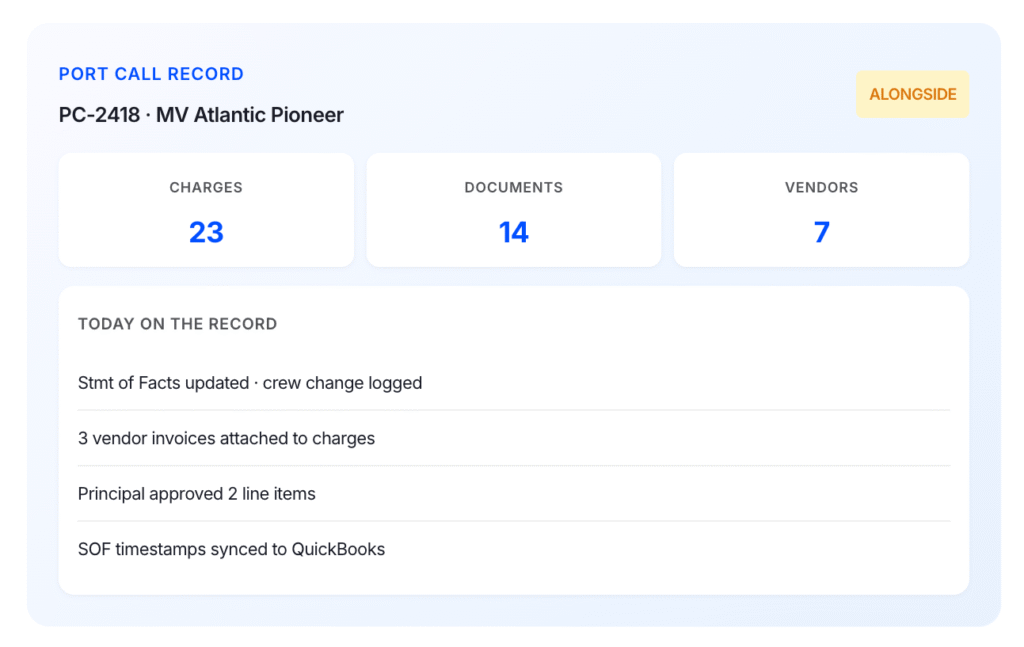
Base gives port agents, operations teams, finance teams, and principals one shared record for each port call.
The record starts with the nomination and follows the job through vendor coordination, approvals, operational updates, PDA preparation, FDA closeout, and billing.
Teams can use Base to manage:
- Vessel, voyage, port, berth, and principal details
- Service requests and vendor quotes
- Purchase orders and approvals
- Tasks, documents, and call updates
- Estimated and actual charges
- Vendor invoices, receipts, and supporting files
- Accounts payable, accounts receivable, and job profitability
This fills the gap between the VMS and the ERP.
The VMS may show the total port cost against the voyage. The ERP may show the vendor bill and customer invoice. Base keeps the detail behind those numbers, including what was ordered, what changed, who approved it, and which documents support the final charge.
Operations can see what is confirmed and what still needs attention. Finance can see which costs have arrived, which charges need backup, and what is ready to bill. Principals can review approved costs and supporting evidence without seeing internal agency work.
Base also connects operational changes to their financial impact.
When a berth shift adds another tug movement or a delay creates overtime charges, the event, approval, vendor invoice, and FDA adjustment remain tied to the same job.
That makes it easier to explain cost changes, catch missed re-billable charges, close the FDA, and answer questions after departure.
Base works alongside the systems already in place. The VMS continues to manage the voyage. The ERP or accounting system continues to hold the books. Base manages the port-call work between them.
For companies that already have a VMS or ERP but still run port calls through email, spreadsheets, and separate files, Base gives that work one clear operational and financial record.
Final Thoughts: Match Each System to the Work It Owns
The right software setup depends on where the current process loses detail.
A VMS may already give commercial teams the voyage-level information they need. An ERP may already support financial posting, payments, and company reporting. The remaining issue is often the work that takes place between the planned voyage and the final accounting entry.
That work includes the nomination, local vendor coordination, changing service requirements, approvals, port documents, PDA updates, FDA evidence, and the explanation behind every cost.
When those records remain scattered, teams spend more time reconciling systems and defending charges. A dedicated port-call record gives the company a clearer path from the first instruction to the final invoice.
Base fills that layer without asking the business to abandon the systems it already depends on. Agents can manage the call as it happens, principals can review the evidence, and finance can send cleaner data into the VMS or ERP.
Key Takeaways
- A voyage management system manages the commercial voyage, including schedules, charter-party terms, freight, bunker exposure, and voyage performance.
- Port call software manages the detailed work at each port, including vendor coordination, approvals, documents, PDA and FDA activity, and supporting evidence.
- A maritime ERP handles company-wide accounting and administrative records, while port call software keeps the operational detail behind each transaction.
- A gap still exists when teams rely on email, spreadsheets, and separate files to manage port-call costs, approvals, and billing support.
- Base connects port-call operations and finance in one job record, giving agents, principals, and finance teams a clearer view of the work, costs, and evidence behind each call.
Frequently Asked Questions
What Are the Four Stages of a Voyage?
A practical voyage structure includes planning and estimation, voyage preparation, port and cargo execution, and financial closeout. Shipping companies may divide these stages further based on their operating model and the type of voyage.
What Does a Voyage Manager Do?
A voyage manager oversees the commercial and operational performance of a vessel voyage. The role may include schedule review, bunker monitoring, charter-party compliance, port-cost oversight, communication with agents, and analysis of the final voyage result.
What Is the Purpose of SMS on a Ship?
SMS usually refers to a Safety Management System. It sets out the procedures, responsibilities, reporting practices, and safety controls used to manage vessel operations. It is separate from voyage management software.
What Is a Voyage in Logistics?
A voyage is the movement or commercial employment of a vessel between defined locations. The record can include cargo, schedule, freight terms, operating costs, contractual requirements, and the final financial result.
Do I Need Port Call Software If I Already Have a VMS?
You may need port call software when the VMS does not cover local vendor coordination, principal approvals, port documents, PDA and FDA preparation, supporting evidence, or detailed port-call job costing. The decision should be based on the work still being handled outside the VMS.
Can Port Call Software Integrate With a VMS or ERP?
Port call software can exchange data with voyage management systems and maritime ERPs through APIs, accounting connections, structured files, or linked records. The setup should identify which system owns each type of data and when approved information moves between them.